Free tool
A sheet for following up on estimates
This file helps you see which estimates are still waiting for an answer, which are already decided, and which should be followed up. It does not decide anything for you.
What the sheet does
- One row per estimate: date sent, customer, work, amount, who owns the follow-up, and follow-up dates.
- Automatic flags for follow-ups that are due, follow-ups that are overdue, and rows whose sent date is missing.
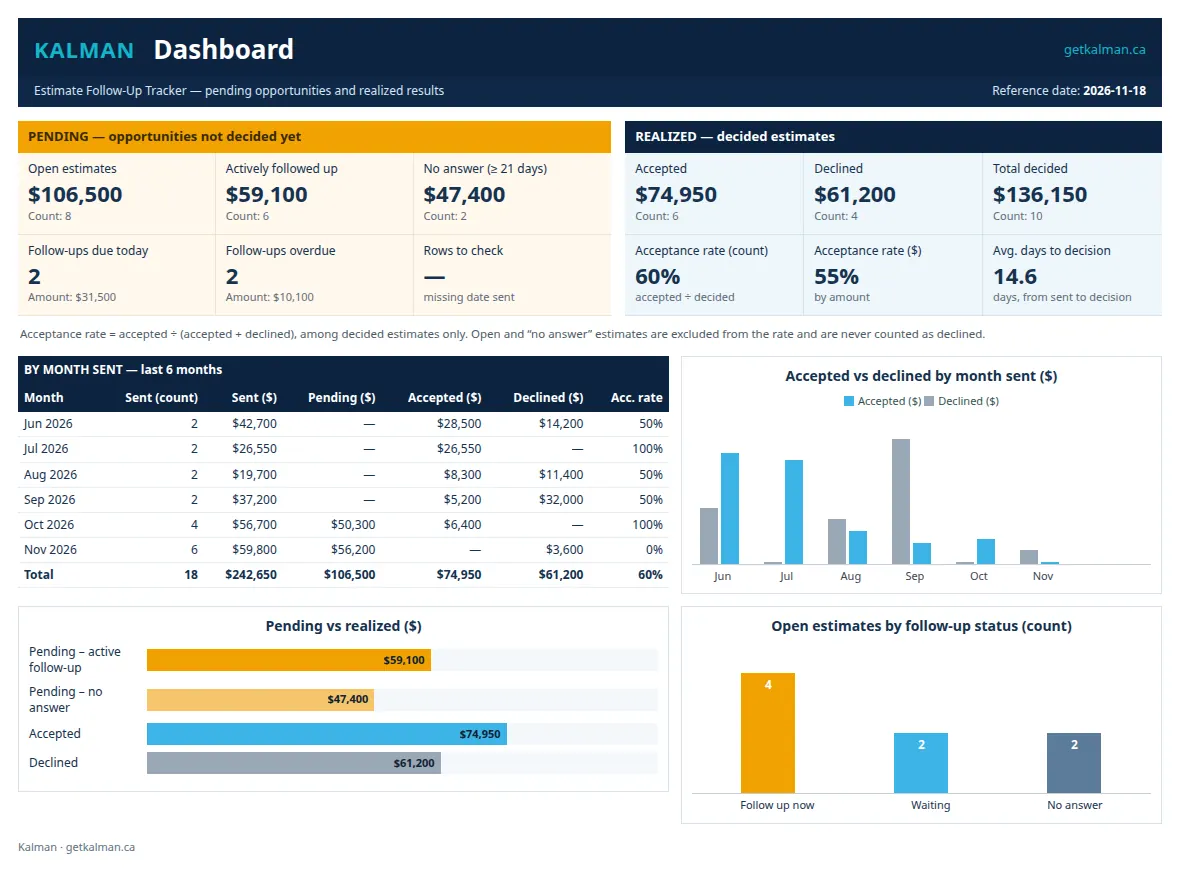
- A dashboard that keeps pending opportunities apart from results already decided.
- The acceptance rate is accepted ÷ (accepted + declined). Estimates that are still open, including those left with “no answer” after the cut-off you set, are excluded. They are never counted as declined.
Dashboard preview
The figures in this image are the examples already entered in the file. They are not Kalman’s results, and not a client’s.
What’s in the file
- Instructions. How to fill in the sheet and read the flags.
- Estimates. Where you enter one row per estimate.
- Settings. The cut-off after which an open estimate becomes “no answer”, for example 21 days. That cut-off is yours, not a standard.
- Dashboard. Pending opportunities on one side, decided results on the other.
Excel and Google Sheets
- Excel. Open the downloaded file.
- Google Sheets. In Google Drive, choose New, then File upload, and select the file. You can also open a spreadsheet, then File, then Import.
The file has no macros, does not connect to any outside service, and does not ask you to sign up. What you type stays on your computer or in your own Drive. Kalman does not receive it.
If you’d like to see how Kalman approaches estimate follow-up with contractors, the pilot page is here: getkalman.ca/en/estimate-follow-up.